
You can extract text from images and videos using Live Text on your Apple devices, enabling tasks like copying text, translations, web searches, currency conversions, and object/people identification.
What you should be aware of
- The Live Text feature, found on iPhone, iPad, and Mac devices, allows you to copy text from images and videos.
- To utilize Live Text, you must have an iPhone XS, XR, or a newer model, or an iPad running iPadOS 15 or later.
What does Live Text refer to?
Live Text enables you to retrieve text from images, papers, objects, and videos. To duplicate text from a photo, open it in the Photos app, pick the word you want, and use the Copy function. Then, in the desired application, paste the text using the Paste option.

The process can be repeated to duplicate text from a physical item by using the camera on the device and picking the text to copy. It is also possible to copy text from an image on a website by tapping the image and selecting the Show Text feature.
Other options
Live Text not only lets you copy text but also enables you to engage in actions like dialing a phone number or sending an email linked in an image by selecting the Connect option.
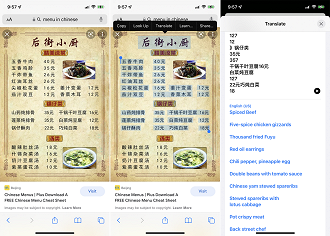
Live Text offers text translation as a notable feature, enabling users to translate text within photos by pointing the camera at physical objects or selecting text from images on websites. Users can simply press the text, choose the Translate option, and select the desired language. Additionally, Live Text permits users to conduct web searches directly from photos or videos.
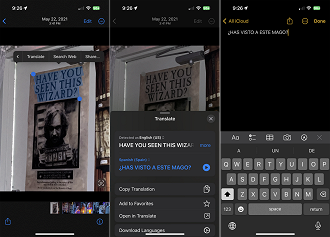
Live Text also has the capability to convert foreign currencies, allowing users to easily view the converted value of foreign currencies to the default currency on their device. Additionally, Live Text enables users to copy and paste images using the Visual Look Up feature, enabling seamless transfer of images between applications.
Information about items in a picture, such as people, plants, animals, and landmarks, can be obtained. Additionally, recipes can be discovered by analyzing images of food dishes.
Requirements for utilizing Live Text
You must have an iPhone XS, XR, or newer, as well as certain iPad models like the 12.9-inch iPad Pro (3rd generation onwards) to utilize Live Text.
You must have iOS/iPadOS 15 or above installed. Check your system version by navigating to Settings > Update > Software. To access new features like capturing live video text and objects from both, you will require iOS/iPadOS 16 or later.
Make sure to check that the function is turned on on your device. To activate it, go to Settings > Language > Region and turn on the toggle for Dynamic Text.